Tag: Tech

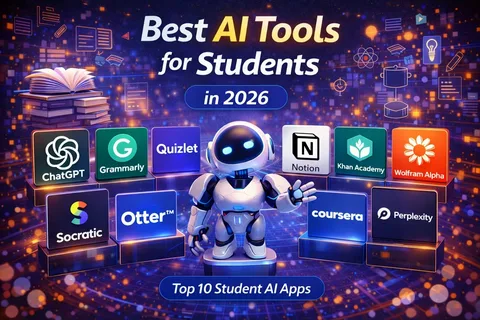
  • Best AI Tools for Students, Freelancers and Businesses in 2026

    Best AI Tools for Students, Freelancers and Businesses in 2026

    Artificial intelligence has become one of the most useful technologies for people who work, study, create content, and run businesses.

    AI tools can now help users write documents, summarize information, analyze data, create images, generate ideas, organize projects, write code, translate languages, and automate repetitive tasks.

    For students, AI can become a useful learning assistant. Freelancers can use it to improve productivity and manage client work, while businesses can use AI to streamline operations and improve customer service.

    However, not every AI tool is designed for the same purpose. The best option depends on what you need to accomplish.

    What Are AI Tools?

    AI tools are software applications that use artificial intelligence to perform or assist with specific tasks.

    Some are designed for text generation, while others focus on images, coding, research, productivity, audio, video, or data analysis.

    Modern AI tools can understand natural-language instructions, making them easier for beginners to use.

    Instead of learning complicated software commands, users can often describe what they want in ordinary language.

    1. ChatGPT

    ChatGPT is one of the most versatile AI assistants available.

    It can help users brainstorm ideas, explain difficult subjects, summarize information, draft documents, analyze content, assist with programming, and organize projects.

    Best For

    • Students
    • Writers
    • Freelancers
    • Researchers
    • Business owners
    • Programmers

    Students can use it to explain difficult concepts or create practice questions.

    Freelancers can use it for brainstorming, proposals, client communication, and content planning.

    Businesses can use AI assistants for internal documentation, idea generation, customer-support workflows, and many other tasks.

    Users should still verify important information because AI systems can sometimes produce inaccurate answers.

    2. Google Gemini

    Google Gemini is Google’s AI assistant and is designed to work across Google’s broader ecosystem.

    Its usefulness can be particularly noticeable for people who already use Google services and productivity applications.

    Depending on the available version and region, Gemini can assist with writing, research, brainstorming, coding, image-related tasks, and other activities.

    Best For

    People who regularly use Google’s ecosystem and want AI assistance integrated into their workflow.

    3. Microsoft Copilot

    Microsoft Copilot is Microsoft’s family of AI-powered tools.

    It can help users with writing, research, productivity, coding, and other tasks depending on the specific Copilot product and subscription.

    For professionals who already use Microsoft 365 applications, AI features can be particularly useful for handling documents, presentations, emails, spreadsheets, and meetings.

    4. Claude

    Claude is an AI assistant developed by Anthropic.

    It is known for its ability to work with long documents and assist with writing, analysis, coding, and research tasks.

    Students can use it to analyze study materials, while professionals can use it for document-based workflows and brainstorming.

    As with other AI systems, users should independently verify important information.

    5. Perplexity

    Perplexity focuses heavily on AI-assisted search and research.

    Instead of simply generating an answer, it can help users explore information from online sources and provide references within its responses.

    This can be useful for students, researchers, writers, and professionals who need to investigate a topic quickly.

    However, sources should still be opened and checked, particularly when accuracy matters.

    6. Canva AI Tools

    Canva has incorporated AI-powered features into its visual design platform.

    These tools can assist users with presentations, graphics, social media designs, images, and other creative projects.

    For freelancers and small businesses, this can reduce the amount of time required to create basic marketing materials.

    Best For

    • Social media creators
    • Freelancers
    • Small businesses
    • Students
    • Marketing teams

    7. Grammarly

    Grammarly uses AI-powered writing assistance to help users improve grammar, clarity, tone, and overall writing quality.

    It can be useful for students preparing assignments, freelancers communicating with clients, and professionals writing emails or reports.

    AI writing assistance should complement a person’s own judgment rather than completely replace it.

    8. GitHub Copilot

    GitHub Copilot is designed to assist software developers with coding.

    It can suggest code, explain programming concepts, help generate functions, and assist developers while working inside supported development environments.

    For students learning programming, it can provide explanations and examples.

    For professional developers, it can help reduce the time spent on repetitive coding tasks.

    Developers should always review generated code for errors, security problems, and compatibility issues.

    9. Notion AI

    Notion combines notes, databases, project management, and collaboration tools with AI features.

    Users can use AI assistance to summarize notes, organize information, generate drafts, and work with documents.

    It can be particularly useful for freelancers and small teams managing projects and information in one workspace.

    10. Adobe Firefly

    Adobe Firefly provides AI-powered creative tools for image and design workflows.

    It can assist designers and creators with generating or modifying visual content.

    For businesses that regularly produce marketing materials, AI-assisted creative tools can speed up the early stages of the design process.

    AI Tools for Students

    Students can benefit from AI in several ways.

    Understanding Difficult Topics

    Instead of simply searching for an answer, students can ask an AI tool to explain a subject at different levels of difficulty.

    For example, a student studying economics could request a beginner-friendly explanation before moving to a more advanced discussion.

    Creating Practice Questions

    AI can generate quizzes, flashcards, and practice questions based on a topic.

    Summarizing Notes

    Long study materials can sometimes be summarized into shorter revision notes.

    However, students should compare AI-generated summaries with the original material to avoid missing important details.

    Language Learning

    AI tools can help learners practice writing, vocabulary, translation, and conversation.

    AI Tools for Freelancers

    Freelancers often have to perform many different jobs themselves.

    They may need to communicate with clients, market their services, create content, manage projects, research topics, and handle administrative work.

    AI can reduce the time required for some of these activities.

    For example, a freelancer could use AI to brainstorm content ideas, prepare an initial proposal, organize a project plan, or improve the clarity of a client email.

    The freelancer should still provide the human judgment and expertise that clients are paying for.

    AI Tools for Businesses

    Businesses can use AI across multiple departments.

    Customer Service

    AI-powered systems can answer common questions and help customers find information.

    Marketing

    AI can assist with brainstorming, content planning, market research, and campaign ideas.

    Data Analysis

    AI tools can help identify patterns in business data and summarize large amounts of information.

    Human Resources

    Businesses can use AI to organize information, draft internal documents, and assist with administrative workflows.

    Software Development

    Development teams can use AI coding assistants to accelerate certain programming tasks.

    Are AI Tools Free?

    Some AI tools offer free plans, while others use subscriptions or usage-based pricing.

    Free versions can be useful for occasional users, but advanced features often require paid plans.

    Before subscribing, determine how frequently you will use the tool and whether its premium features actually solve a problem for you.

    Are AI Tools Safe to Use?

    AI tools can be useful, but users should be careful about the information they provide.

    Avoid entering highly sensitive personal, financial, business, or confidential information unless you understand how the service handles that data and have appropriate authorization.

    Businesses should also establish clear policies for employees using AI tools.

    AI Does Not Replace Human Judgment

    One of the biggest mistakes users can make is assuming that AI is always correct.

    AI systems can make mistakes, misunderstand instructions, invent information, or produce outdated material.

    This is especially important when dealing with:

    • Legal information
    • Financial decisions
    • Medical information
    • Academic research
    • Business-critical data
    • Technical systems

    AI should be treated as an assistant rather than an unquestionable authority.

    How to Choose the Right AI Tool

    Before choosing an AI platform, ask yourself:

    1. What task do I want AI to help with?
    2. Do I need text, image, video, coding, or research assistance?
    3. Does the tool integrate with my existing software?
    4. Is there a free version?
    5. How much does the paid version cost?
    6. How does the company handle my data?
    7. Can I verify the information it provides?
    8. Does it save enough time to justify the cost?

    Answering these questions can prevent you from subscribing to several tools that perform essentially the same job.

    Final Thoughts

    AI tools are becoming increasingly useful for students, freelancers, and businesses in 2026.

    Tools such as ChatGPT, Google Gemini, Microsoft Copilot, Claude, Perplexity, Canva’s AI features, Grammarly, GitHub Copilot, Notion AI, and Adobe Firefly serve different purposes.

    The best AI tool is not necessarily the most advanced or expensive one. It is the tool that solves a real problem in your daily workflow.

    Students can use AI to support learning, freelancers can use it to increase productivity, and businesses can use it to automate repetitive tasks and improve operations.

    The key is responsible use. Always review AI-generated information, protect sensitive data, and use human judgment when accuracy and decision-making matter.

    AI works best when it helps people do better work rather than simply doing all the work for them.
  • Windows 12: Expected Features, System Requirements and Release Updates

    Windows 12: Expected Features, System Requirements and Release Updates

    Windows has remained one of the world’s most widely used desktop operating systems, powering computers in homes, schools, offices, and businesses. Because Microsoft regularly develops new versions and major updates, many users are interested in what the future could bring after Windows 11.

    One name that frequently appears in online discussions is Windows 12.

    However, it is important to separate confirmed information from rumors and speculation. Microsoft has not officially announced a consumer operating system called Windows 12 with a definitive release date and final feature list.

    Instead, Microsoft’s recent Windows strategy has focused heavily on Windows 11 updates, new AI capabilities, and regular feature improvements.

    So what could a future Windows version look like?

    What Is Windows 12?

    Windows 12 is commonly used as an unofficial name for a possible future major version of Microsoft’s Windows operating system.

    There has been considerable speculation about what such a release might include, particularly as Microsoft continues integrating artificial intelligence into Windows.

    A future major Windows release could potentially bring changes to the user interface, system performance, security, AI functionality, hardware requirements, and cloud-connected features.

    Until Microsoft officially announces such a product, however, specific features and release dates should be treated as unconfirmed.

    Why Are People Expecting Windows 12?

    Microsoft has historically released major Windows versions over time.

    Windows 10 was followed by Windows 11, which introduced a redesigned interface, updated system requirements, new productivity features, and hardware-security requirements.

    As technology continues to develop, users naturally expect Microsoft to eventually introduce another major version.

    The growing importance of AI has also increased speculation about what a future Windows operating system could look like.

    Artificial Intelligence Could Be a Major Focus

    AI is one of the strongest trends shaping Microsoft’s software strategy.

    A future Windows release could potentially include deeper AI integration throughout the operating system.

    Possible areas include:

    • Intelligent search
    • AI-powered file organization
    • Automated settings assistance
    • Personalized recommendations
    • Improved accessibility
    • AI-powered productivity tools
    • Local AI processing
    • Smarter system management

    Some AI capabilities are already appearing in current Windows products, so a future version could expand on those ideas.

    Possible Interface Changes

    A major Windows release could introduce visual changes.

    Microsoft has already redesigned parts of Windows over recent years, including the Start menu, taskbar, Settings application, File Explorer, and system menus.

    A future Windows version could continue this process with a more consistent interface.

    Potential changes could include improved widgets, redesigned system controls, smoother animations, and greater customization.

    However, there is no confirmed final interface for a Windows 12 product.

    Hardware Requirements

    One of the biggest questions surrounding any future Windows version is hardware compatibility.

    Windows 11 already introduced stricter hardware requirements than previous versions, including requirements related to supported processors, Secure Boot, and TPM 2.0 on compatible systems.

    A future Windows release could potentially require newer hardware to support advanced security and AI features.

    This could be particularly relevant to users with older laptops and desktop computers.

    Before upgrading, users should always check Microsoft’s official compatibility information rather than relying on unofficial lists.

    AI PCs and Windows

    The growth of AI-capable PCs could influence the future of Windows.

    Newer processors increasingly include dedicated hardware designed to accelerate AI workloads.

    These components can help computers perform certain AI-related tasks more efficiently.

    Microsoft has also promoted the concept of AI PCs and Copilot+ PCs, which use specialized hardware for supported AI experiences.

    A future Windows version could potentially take greater advantage of these capabilities.

    Performance Improvements

    Users naturally expect a new operating system to provide better performance.

    A future Windows release could focus on:

    • Faster startup
    • Improved memory management
    • Better battery efficiency
    • Reduced background activity
    • More efficient updates
    • Improved gaming performance

    However, a new operating system does not automatically make every computer faster.

    Performance depends heavily on the processor, RAM, storage, drivers, applications, and hardware configuration.

    Gaming Features

    Windows remains an important platform for PC gaming.

    Microsoft could continue improving gaming-related features in future Windows releases.

    Possible areas of development include better graphics optimization, improved game installation, enhanced controller support, and deeper integration with Xbox services.

    DirectX and other Microsoft gaming technologies could also continue evolving alongside new hardware.

    Security Improvements

    Security is likely to remain a major priority.

    Modern operating systems face increasingly sophisticated threats, including malware, phishing, ransomware, and identity attacks.

    Future Windows versions could introduce stronger hardware-based security requirements and improved protection against malicious software.

    Features such as secure boot, hardware security modules, biometric authentication, and application isolation could become increasingly important.

    Will Windows 12 Be Free?

    There is currently no confirmed pricing model for a product officially called Windows 12.

    Microsoft has offered free upgrades between certain Windows versions under specific conditions, but future licensing policies cannot be assumed.

    Users should wait for official Microsoft announcements before making decisions based on rumored pricing.

    Will Older Computers Support It?

    This is one of the biggest concerns for users with older computers.

    If Microsoft introduces stricter processor or AI-hardware requirements, some older systems could potentially be excluded.

    This would not necessarily mean that those computers immediately become unusable. Existing operating systems can continue working within their supported lifetimes.

    However, users should consider security support and software compatibility when deciding how long to keep an older computer.

    Windows 12 vs Windows 11

    Without an official Windows 12 product announcement, a definitive comparison is impossible.

    Windows 11 remains Microsoft’s current mainstream desktop operating system, while rumors about Windows 12 focus heavily on what a future major release might offer.

    A future version could potentially provide deeper AI integration, improved performance, stronger security, and additional interface changes.

    Until Microsoft confirms the product, users should avoid treating rumored specifications as final.

    Should You Wait for Windows 12?

    For most people, there is little reason to stop using a computer simply because a future Windows release is rumored.

    If your current PC runs Windows 11 properly and receives security updates, continuing to use it is generally more practical than making a purchase based on speculation.

    If you already need a new computer, choose hardware based on your current requirements.

    A modern processor, sufficient RAM, fast SSD storage, and good battery life are likely to remain useful regardless of future Windows releases.

    Final Thoughts

    Windows 12 remains a topic of considerable interest, particularly as Microsoft expands AI capabilities across its software and hardware ecosystem.

    However, rumors about release dates, specifications, features, and hardware requirements should not be confused with official information.

    For now, Windows 11 remains the current platform for Microsoft’s mainstream PC operating system strategy.

    If Microsoft eventually introduces a major Windows successor, AI, security, performance, cloud integration, and hardware acceleration are likely to be important areas of development.

    Until then, users should rely on Microsoft’s official announcements when making upgrade or hardware-purchase decisions.

  • Best Budget Laptops for Students and Professionals in 2026

    Best Budget Laptops for Students and Professionals in 2026

    Finding a good laptop on a limited budget can be challenging in 2026. There are hundreds of models available, and specifications can sometimes make the buying process feel like decoding a spaceship dashboard.

    The good news is that you do not always need an expensive premium laptop to get excellent performance. Affordable laptops can handle everyday tasks such as browsing the web, attending online classes, creating documents, watching videos, managing emails, and running many professional applications.

    The key is knowing which specifications matter and choosing a laptop that matches your actual needs.

    What Makes a Good Budget Laptop?

    A budget laptop should offer a reasonable balance between performance, battery life, build quality, display quality, and price.

    Before purchasing one, pay attention to:

    • Processor
    • RAM
    • Storage
    • Display
    • Battery life
    • Keyboard and trackpad
    • Ports
    • Operating system
    • Weight and portability
    • Warranty and support

    A cheap laptop with poor specifications may save money initially but become frustrating after a few months.

    1. Acer Aspire Series

    The Acer Aspire family remains popular among students and everyday users because it offers different configurations across several price ranges.

    Depending on the specific model, buyers can find processors suitable for browsing, office applications, online learning, and light creative work.

    The Aspire series is particularly useful for students who need a practical laptop without paying for premium materials or unnecessary features.

    Best For

    • Students
    • Office workers
    • Web browsing
    • Online classes
    • Microsoft Office
    • General productivity

    2. Lenovo IdeaPad Series

    Lenovo’s IdeaPad lineup is another strong option for budget-conscious buyers.

    IdeaPad laptops are available in different sizes and hardware configurations, making it easier to find one suited to basic productivity or more demanding workloads.

    The keyboard experience is also an important advantage for people who spend several hours writing assignments, emails, reports, or documents.

    Best For

    Students and professionals who want a versatile everyday laptop.

    3. HP 15 Series

    HP offers several affordable laptops designed for students and home users.

    The HP 15 family typically focuses on practical features rather than premium design.

    Depending on the configuration, buyers can get enough processing power for office applications, browsing, video calls, entertainment, and schoolwork.

    It can be a good choice for someone who needs a straightforward laptop for everyday tasks.

    4. ASUS VivoBook Series

    ASUS VivoBook laptops are designed for users who want a balance between portability, performance, and modern design.

    Many VivoBook models feature relatively slim designs while providing hardware capable of handling common productivity applications.

    Some configurations are also suitable for light creative work.

    Best For

    • Students
    • Freelancers
    • Content creators
    • Remote workers
    • Everyday computing

    5. Dell Inspiron Series

    Dell’s Inspiron family includes laptops covering several price categories.

    They are often aimed at students, families, and professionals who want a dependable computer for everyday use.

    Depending on the model, users can find configurations with enough memory and storage for multitasking and productivity.

    Dell also has an established support network in many markets, although availability varies by country.

    6. Chromebook Options

    Chromebooks can be an excellent option for users who primarily work online.

    Instead of running traditional desktop software in the same way as Windows laptops, Chromebooks use ChromeOS and focus heavily on web applications and cloud services.

    They can be particularly useful for:

    • Online classes
    • Google Docs
    • Email
    • Web browsing
    • Video calls
    • Streaming
    • Cloud-based applications

    However, a Chromebook may not be suitable for someone who depends on specialized Windows applications.

    7. Microsoft Surface Laptop Go Series

    Microsoft’s smaller Surface laptops have targeted students and users looking for lightweight computers.

    Their compact designs can make them convenient for carrying between classrooms, offices, cafés, and meetings.

    The exact hardware and pricing vary between generations, so buyers should compare current configurations carefully.

    How Much RAM Do You Need?

    RAM affects how many applications a laptop can comfortably keep open at the same time.

    For basic tasks such as browsing, word processing, email, and online classes, 8GB of RAM can be a reasonable starting point.

    If you regularly use many applications simultaneously, edit photos, work with large spreadsheets, or perform other demanding tasks, 16GB can provide more breathing room.

    For most budget buyers, it is better to prioritize sufficient RAM over flashy features that do not improve everyday productivity.

    How Much Storage Is Enough?

    Storage determines how much space you have for applications, documents, photos, videos, and other files.

    A laptop with an SSD is generally preferable to an older mechanical hard drive because SSDs provide faster startup times and quicker file access.

    For many students and professionals, 256GB of SSD storage can be workable, while 512GB provides more flexibility.

    People who store large video libraries or professional files may need more storage or an external drive.

    Which Processor Should You Choose?

    The processor is one of the most important components in a laptop.

    Modern budget laptops can use processors from Intel, AMD, Qualcomm, and other manufacturers.

    For basic tasks, you do not necessarily need a high-end processor.

    However, avoid choosing a laptop based solely on a processor’s brand name. Look at the exact processor generation and model because performance can vary significantly.

    For professional work, multitasking, programming, photo editing, or other demanding applications, spending a little more on the processor can be worthwhile.

    Battery Life

    Students and professionals often spend hours away from a power outlet.

    A laptop with good battery life can therefore be more useful than one that offers slightly higher performance but requires constant charging.

    Battery life varies according to screen brightness, applications, processor efficiency, network activity, and battery capacity.

    Manufacturers’ battery estimates should be treated as guidelines rather than guaranteed real-world results.

    Display Quality

    The display is easy to overlook when comparing specifications.

    If you spend several hours reading documents or watching lectures, a poor display can make the experience uncomfortable.

    Look for:

    • Full HD or better resolution
    • Good brightness
    • Comfortable viewing angles
    • Suitable screen size
    • Anti-glare treatment where available

    A 14-inch laptop can provide a good balance between screen space and portability, while a 15.6-inch model may be better for users who prefer a larger workspace.

    Best Budget Laptop for Students

    Students should prioritize portability, battery life, keyboard quality, reliability, and price.

    A good student laptop does not need a powerful gaming GPU unless the student’s course requires specialized software.

    For writing assignments, attending online classes, researching, browsing, presentations, and spreadsheets, a modern mid-range processor with 8GB or 16GB of RAM and SSD storage can be sufficient.

    Best Budget Laptop for Professionals

    Professionals should choose according to their specific workload.

    Someone working with email, spreadsheets, documents, and video meetings may not need an expensive machine.

    A programmer, designer, engineer, or video editor may need significantly more processing power, memory, and storage.

    Remote workers should also consider webcam quality, microphone performance, Wi-Fi connectivity, and battery life.

    Windows vs ChromeOS

    Windows remains the most flexible choice for many professionals because it supports a wide range of desktop applications.

    ChromeOS can be excellent for users who primarily work through web-based applications.

    The best operating system depends on your workflow.

    Before buying a Chromebook, check that the applications you use for school or work are available and compatible.

    Should You Buy a Used Laptop?

    A used or refurbished laptop can provide excellent value, particularly when buying a higher-end model at a reduced price.

    However, inspect the device carefully.

    Check:

    • Battery health
    • Screen condition
    • Keyboard
    • Trackpad
    • Charging port
    • USB ports
    • Wi-Fi
    • Webcam
    • Storage health
    • Operating system
    • Warranty

    A refurbished laptop from a reputable seller can sometimes be a better purchase than a brand-new low-end machine.

    Common Mistakes to Avoid

    One common mistake is buying the cheapest laptop available without checking its specifications.

    Another is choosing a laptop with a powerful processor but too little RAM or storage.

    Buyers should also avoid assuming that a larger number automatically means better performance.

    For example, processor generations matter, and storage technology can make a major difference to everyday responsiveness.

    It is also important to consider future needs. A laptop purchased today may need to remain useful for several years.

    Quick Buying Checklist

    Before purchasing a budget laptop, ask:

    1. Does it have an SSD?
    2. Does it have enough RAM?
    3. Is the processor modern enough for my workload?
    4. Is the display comfortable?
    5. Is the battery sufficient?
    6. Does it have the ports I need?
    7. Does it support the software I use?
    8. Is the keyboard comfortable?
    9. Does it have a reliable warranty?
    10. Can I upgrade the RAM or storage if necessary?

    Final Thoughts

    The best budget laptop in 2026 is not necessarily the cheapest model on the shelf.

    Students should focus on battery life, portability, reliability, and productivity features, while professionals should choose hardware according to the applications they use.

    Laptop families such as Acer Aspire, Lenovo IdeaPad, HP 15, ASUS VivoBook, and Dell Inspiron provide a wide range of configurations for different budgets. Chromebooks can also be excellent for users who primarily work online.

    Before buying, compare the exact configuration rather than relying only on the laptop’s series name. Check the processor, RAM, SSD capacity, display, battery, warranty, and software compatibility.

    A carefully chosen budget laptop can provide years of useful service without requiring you to spend flagship-level money.

  • iPhone vs Samsung in 2026: Which Smartphone Is Better?

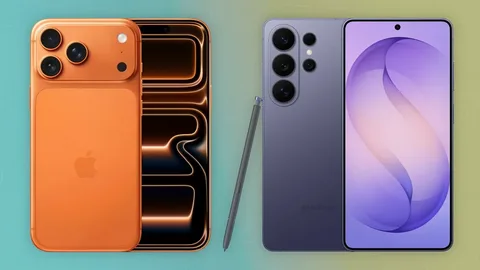
    iPhone vs Samsung in 2026: Which Smartphone Is Better?

    Choosing between an iPhone and a Samsung smartphone remains one of the biggest decisions for people shopping for a premium phone in 2026. Both brands offer powerful processors, advanced cameras, high-quality displays, artificial intelligence features, strong security, and premium designs.

    Apple and Samsung also take very different approaches to their software and hardware. Apple focuses on the tightly integrated iOS ecosystem, while Samsung offers Android with extensive customization and a wide range of devices.

    So, which is better in 2026: iPhone or Samsung?

    There is no single answer for everyone. The better choice depends on your budget, preferred operating system, camera needs, gaming habits, battery requirements, and the other devices you already own.

    iPhone vs Samsung: The Main Difference

    The biggest difference between the two brands is their software.

    iPhones run Apple’s iOS operating system, while Samsung Galaxy phones use Google’s Android operating system with Samsung’s own interface and features.

    Apple controls both the iPhone hardware and iOS software. This allows the company to tightly integrate its devices.

    Samsung, on the other hand, gives users more flexibility and customization through Android.

    Both approaches have advantages.

    Design and Build Quality

    Premium iPhones and Samsung Galaxy devices both use high-quality materials and sophisticated designs.

    Apple generally maintains a recognizable design language across its iPhone lineup. Samsung has experimented more with different screen designs, camera arrangements, and foldable smartphones.

    Samsung’s Galaxy lineup also includes devices such as the Galaxy Z Fold and Galaxy Z Flip, giving buyers form factors that Apple does not currently offer.

    For buyers who want a conventional premium smartphone, both brands provide excellent options.

    For someone interested in foldable phones, Samsung has a clear advantage because of its established foldable lineup.

    Display Quality

    Samsung has historically been one of the strongest companies in smartphone display technology, and its flagship Galaxy phones feature bright, high-resolution OLED displays with smooth refresh rates.

    Apple’s premium iPhones also offer excellent OLED displays with strong brightness, color accuracy, contrast, and smooth animations.

    For ordinary users, the difference between modern flagship displays may be less significant than it once was.

    Samsung can be particularly attractive to people who prefer very large displays, while Apple offers several screen sizes across its lineup.

    Performance

    Both companies offer extremely powerful processors.

    Apple’s custom-designed chips are known for strong performance and efficiency. Samsung’s flagship Galaxy devices use high-end processors that provide excellent performance for gaming, multitasking, photography, video editing, and AI applications.

    For everyday activities such as WhatsApp, Instagram, YouTube, browsing, email, and photography, both platforms provide more than enough performance.

    The differences become more noticeable in demanding tasks such as high-end gaming, professional video editing, and advanced AI processing.

    Camera Comparison

    Camera quality is one of the most important reasons people choose premium smartphones.

    Samsung’s flagship phones often provide multiple camera options, including wide, ultra-wide, and telephoto systems. Some models are particularly strong when it comes to zoom photography.

    Apple focuses heavily on image processing, video recording, color consistency, and ease of use.

    iPhone Camera Strengths

    • Excellent video recording
    • Consistent image processing
    • Strong portrait photography
    • Reliable autofocus
    • Good integration with editing apps

    Samsung Camera Strengths

    • Strong zoom capabilities
    • Flexible camera systems
    • High-resolution photography
    • Numerous camera modes
    • Extensive manual controls on supported models

    If you record a lot of videos for social media, the iPhone can be particularly appealing.

    If you enjoy experimenting with photography and zoom, Samsung may have more flexibility.

    Software Experience

    The software experience is one of the biggest differences between the two brands.

    iOS is known for its simple interface, consistent design, strong privacy controls, and close integration with Apple’s hardware ecosystem.

    Samsung’s Android software offers considerably more customization.

    Users can change themes, layouts, widgets, default applications, and many aspects of the user interface.

    Samsung also adds productivity features that can be useful for multitasking and people who use their phones as work devices.

    Artificial Intelligence Features

    AI has become a major smartphone feature in 2026.

    Both Apple and Samsung integrate AI into various aspects of their devices.

    AI features can assist with tasks such as:

    • Writing and editing
    • Image editing
    • Translation
    • Summarization
    • Search
    • Voice assistance
    • Photo organization
    • Productivity

    The exact features available can vary by device, software version, country, and language.

    When comparing phones, buyers should check the features available on the specific model rather than assuming every AI feature works everywhere.

    Battery Life

    Battery performance depends on the specific model rather than simply the brand.

    Large Samsung Galaxy models can include large batteries and efficient displays, while Apple’s hardware and software optimization can help iPhones achieve strong battery performance despite differences in battery capacity.

    Real-world battery life depends on screen brightness, mobile network conditions, gaming, video recording, background applications, and other factors.

    For heavy users, it is worth looking at independent battery tests for the exact models being compared.

    Charging

    Samsung generally offers more charging flexibility across its Galaxy lineup.

    Some Samsung models support faster wired charging than competing iPhones, while wireless charging is available on many premium devices.

    Apple also supports wired and wireless charging and has developed its own charging ecosystem around the iPhone.

    Charging speed may not be the most important factor for a light user, but it can make a significant difference for people who frequently need to recharge during the day.

    Ecosystem

    The ecosystem is one of Apple’s biggest advantages.

    An iPhone works closely with products such as the Mac, iPad, Apple Watch, and AirPods.

    Features such as AirDrop, iCloud synchronization, and device continuity can make moving between Apple devices extremely convenient.

    Samsung also has a growing ecosystem involving Galaxy phones, tablets, watches, earbuds, Windows PCs, and other devices.

    For someone who already owns several Apple products, an iPhone may be the natural choice.

    For Android users who use Windows computers and a range of different brands, Samsung can offer more flexibility.

    Gaming

    Both platforms are capable gaming machines.

    Premium iPhones offer powerful processors and strong graphics performance. Samsung’s flagship Galaxy devices also provide high-performance hardware, large displays, and features designed for gaming.

    The best gaming phone depends on the specific game, thermal performance, display refresh rate, battery life, and software optimization.

    Android can provide more flexibility for certain gaming configurations, while iOS has a strong selection of optimized premium applications and games.

    Storage

    Storage is another important consideration.

    People who record lots of high-resolution videos, download large games, or keep extensive media libraries should consider purchasing enough storage from the beginning.

    Neither platform should be judged only by its base storage option because storage configurations vary between models.

    If you plan to keep a phone for several years, paying for additional storage can be more practical than constantly deleting files.

    Security and Privacy

    Apple places significant emphasis on privacy and security.

    iOS provides strong security controls, regular software updates, and extensive control over application permissions.

    Samsung and Android also provide sophisticated security features, including biometric authentication, application permissions, secure folders, and hardware-backed security technologies on supported devices.

    Both ecosystems can be secure when users keep their devices updated and follow good security practices.

    Software Updates

    Long-term software support is important when buying an expensive smartphone.

    Apple has historically provided long software support for iPhones, allowing older devices to receive newer versions of iOS for years.

    Samsung has also significantly expanded its software-support commitments for selected recent Galaxy devices.

    However, support varies by model, so buyers should check the official update policy for the specific phone they plan to purchase.

    Price

    Price is one area where the comparison becomes more complicated.

    Apple primarily positions the iPhone as a premium product, although older models and lower-priced options can provide more affordable entry points.

    Samsung has a much wider range of smartphones.

    Its Galaxy lineup includes budget devices, mid-range phones, premium flagships, and foldable smartphones.

    This gives Samsung an advantage for buyers who want more choices across different budgets.

    iPhone Advantages

    An iPhone may be the better choice if you prioritize:

    • Simple and consistent software
    • Long-term software support
    • Video recording
    • Apple ecosystem integration
    • Strong performance
    • Privacy features
    • Easy device-to-device communication

    Samsung Advantages

    Samsung may be the better choice if you prioritize:

    • Android customization
    • Large displays
    • Camera versatility
    • Zoom photography
    • Foldable phones
    • Fast charging on supported models
    • A wide range of prices
    • Multitasking and productivity features

    Which One Should You Buy in 2026?

    Choose an iPhone if you already use Apple devices and want a seamless ecosystem, strong video capabilities, straightforward software, and long-term support.

    Choose Samsung if you prefer Android, want extensive customization, need greater hardware variety, or are interested in foldable phones.

    Neither brand is objectively better in every category.

    A professional who relies heavily on a Mac and Apple Watch may benefit more from an iPhone. Someone who prefers customization and wants a foldable smartphone may find Samsung more attractive.

    Final Verdict

    The iPhone vs Samsung debate is unlikely to disappear anytime soon.

    In 2026, both brands offer excellent smartphones with powerful processors, sophisticated cameras, bright displays, AI-powered software, and strong security.

    The iPhone is particularly attractive for users who value Apple’s ecosystem, video recording, simplicity, and long-term software support. Samsung is an excellent choice for users who want Android flexibility, customization, camera versatility, and a wider selection of hardware.

    Before buying, compare the exact models rather than judging the brands as a whole. Look at price, battery life, camera performance, storage, software support, charging, and the features you actually use.

    Ultimately, the best smartphone is not necessarily the one with the longest specification sheet. It is the one that fits your daily life.

  • Best Smartphones to Buy in 2026: Features, Prices and Performance

    Best Smartphones to Buy in 2026: Features, Prices and Performance

    The smartphone market in 2026 offers more choices than ever. From premium flagship phones with powerful processors and advanced cameras to affordable devices designed for everyday use, buyers have plenty of options to consider.

    A smartphone is no longer simply a device for making calls and sending messages. Modern phones are used for photography, gaming, banking, social media, work, entertainment, navigation, and artificial intelligence.

    With so many models available, choosing the right smartphone can be difficult. The best phone depends on your budget, preferred operating system, camera requirements, battery expectations, and the features you use most.

    Here are some of the major smartphones worth considering in 2026.

    What Should You Look for in a Smartphone?

    Before buying a new phone, it is important to look beyond the brand name.

    Some of the most important specifications include:

    • Processor performance
    • RAM and storage
    • Camera quality
    • Battery capacity
    • Charging speed
    • Display quality
    • Software support
    • Build quality
    • Connectivity
    • Price

    A powerful processor may be important for gamers, while someone who mainly uses WhatsApp, YouTube, Facebook, and email may benefit more from a good battery and reliable software support.

    1. Apple iPhone 17 Pro Max

    Apple’s Pro Max models traditionally target users who want a premium smartphone with powerful performance, advanced cameras, and a large display.

    The iPhone 17 Pro Max is positioned toward people who want a high-end iOS experience and strong performance for photography, video recording, gaming, and productivity.

    Key Features

    • Premium display
    • High-performance processor
    • Advanced camera system
    • Long-term software support
    • Face ID security
    • Strong video capabilities

    The iPhone is also attractive to people already invested in Apple’s ecosystem, including Mac, iPad, Apple Watch, and AirPods.

    2. Samsung Galaxy S26 Ultra

    Samsung’s Ultra series is designed for users who want a feature-rich Android flagship.

    The Galaxy S26 Ultra combines a large high-resolution display with powerful hardware, advanced cameras, productivity features, and Samsung’s software ecosystem.

    Its large screen makes it particularly useful for watching videos, editing documents, browsing the internet, and multitasking.

    Key Features

    • Large premium display
    • Advanced camera system
    • Powerful processor
    • S Pen functionality
    • Strong multitasking capabilities
    • Premium construction

    The S26 Ultra is a particularly interesting option for Android users who want as many features as possible in one device.

    3. Google Pixel 10 Pro

    Google’s Pixel phones have become known for their photography and clean Android experience.

    The Pixel 10 Pro is aimed at users who want strong computational photography, Google’s software features, and a relatively straightforward Android interface.

    Google also integrates artificial intelligence deeply into its software experience.

    Best For

    The Pixel line can be a good choice for people who prioritize photography, software features, and Google’s Android ecosystem.

    4. OnePlus 14

    OnePlus continues to target consumers who want flagship-level performance without necessarily paying the highest premium prices.

    A OnePlus flagship can be particularly attractive to users interested in fast performance, smooth displays, rapid charging, and gaming.

    For people who spend a lot of time using demanding applications, a performance-focused smartphone can make a noticeable difference.

    5. Xiaomi 16 Ultra

    Xiaomi’s Ultra series targets users looking for high-end hardware and advanced camera capabilities.

    The company has increasingly focused on premium photography, powerful processors, high-quality displays, and fast charging.

    Availability and pricing can vary considerably between markets, so buyers should check local specifications before purchasing.

    6. Samsung Galaxy Z Fold

    Foldable smartphones have become increasingly practical.

    Samsung’s Galaxy Z Fold series provides a large internal display that can make multitasking and productivity easier while still offering a smaller external screen for everyday use.

    A foldable phone can be useful for people who frequently read documents, manage multiple applications, watch videos, or work from their phone.

    However, foldables generally cost more than traditional smartphones and have a more complicated physical design.

    7. iPhone 17

    Not everyone needs a Pro Max smartphone.

    A standard iPhone can offer much of the core iOS experience at a lower price than Apple’s top-end models.

    For users who want a dependable phone for social media, photography, messaging, video, gaming, and everyday applications, the standard model may provide a better balance between price and features.

    8. Samsung Galaxy A Series

    Samsung’s Galaxy A series is designed for buyers who want many modern smartphone features without paying flagship prices.

    Depending on the model, users can get large displays, multiple cameras, strong battery life, 5G connectivity, and modern Android software.

    These phones are particularly relevant to students and budget-conscious buyers.

    9. Google Pixel A Series

    Google’s A-series phones provide an alternative for people who want Pixel software and photography features at a lower price.

    They typically sacrifice some premium hardware features compared with Google’s Pro models while retaining many of the software advantages.

    For everyday users, this can be an attractive combination.

    10. Nothing Phone Series

    Nothing has developed a distinctive identity through transparent-inspired designs and a minimalist software experience.

    Its smartphones appeal to buyers who want something different from the conventional designs used by many major manufacturers.

    The phones can be particularly interesting for consumers who care about design as much as specifications.

    Smartphone Performance in 2026

    Performance has become increasingly important as smartphones handle more demanding applications.

    Modern processors are capable of running advanced games, editing high-resolution videos, processing photographs, and supporting AI features directly on the device.

    For most ordinary users, however, buying the most powerful processor available may not be necessary.

    A mid-range phone with sufficient RAM and optimized software can provide an excellent experience for messaging, browsing, social media, streaming, and everyday productivity.

    Camera Quality

    Smartphone cameras have improved dramatically.

    Today’s phones can combine multiple camera sensors with computational photography to produce detailed images in challenging lighting conditions.

    When comparing cameras, do not look only at megapixels.

    Consider:

    • Main camera quality
    • Ultra-wide camera
    • Telephoto capability
    • Night photography
    • Video stabilization
    • Front camera quality
    • Zoom performance

    A phone with fewer megapixels can sometimes produce better photographs because image processing, sensor quality, lenses, and software also matter.

    Battery Life and Charging

    Battery life remains one of the most important smartphone features.

    A phone with excellent performance is less useful if its battery constantly needs charging.

    When comparing devices, consider both battery capacity and software efficiency.

    Fast charging can also be valuable for people with busy schedules. A short charging session can provide enough power to continue using the phone for several hours.

    Wireless charging is another convenience feature available on many premium models.

    Display Technology

    Smartphone displays have become brighter, smoother, and more energy-efficient.

    Many modern phones use OLED or AMOLED panels, which can provide excellent contrast and deep blacks.

    Higher refresh rates can also make scrolling and animations feel smoother.

    For people who watch a lot of videos or play games, display quality can have a significant impact on the experience.

    How Much RAM and Storage Do You Need?

    The amount of RAM you need depends on how you use your phone.

    For basic tasks such as messaging, browsing, and social media, a moderate amount of RAM is usually sufficient.

    Heavy multitasking and gaming can benefit from additional memory.

    Storage is equally important.

    If you take many photos and videos, download games, or keep large files on your phone, choosing a higher storage capacity can prevent problems later.

    Android vs iPhone in 2026

    The choice between Android and iPhone remains largely a matter of personal preference.

    iPhone Advantages

    • Long software support
    • Strong integration with Apple’s ecosystem
    • Consistent performance
    • Excellent video capabilities
    • Simple device-to-device integration

    Android Advantages

    • More device choices
    • Greater price variety
    • More customization
    • Foldable phone options
    • Wide range of hardware features

    Neither platform is universally better. The best choice depends on what you already use and which features matter most to you.

    How to Choose the Best Smartphone

    Before purchasing a phone, determine your priorities.

    If photography is important, focus on camera performance.

    If you play demanding games, prioritize processor performance, cooling, display refresh rate, and battery life.

    If you mainly use social media and messaging, you may not need an expensive flagship.

    Also consider software updates and warranty support. A phone that receives updates for several years can provide better long-term value.

    Final Thoughts

    The best smartphones to buy in 2026 range from premium flagship devices to affordable models designed for everyday users.

    High-end options such as the iPhone 17 Pro Max and Samsung Galaxy S26 Ultra target consumers who want powerful hardware and advanced features. Google Pixel devices appeal to photography and software enthusiasts, while brands such as OnePlus, Xiaomi, Samsung, and Nothing provide alternatives across different price categories.

    Instead of choosing a phone simply because it is popular, consider your actual needs. Think about your budget, camera requirements, battery expectations, storage needs, gaming habits, and preferred operating system.

    The best smartphone is ultimately the one that gives you the features you need without making you pay for features you will rarely use.

  • AI in 2026: How Artificial Intelligence Is Changing Everyday Life

    AI in 2026: How Artificial Intelligence Is Changing Everyday Life

    Artificial intelligence has moved from being something people mostly associated with science fiction to becoming part of everyday life. In 2026, AI is being used in smartphones, cars, workplaces, schools, healthcare, entertainment, shopping, and even ordinary household activities.

    Many people use AI every day without necessarily realizing it. When a phone recognizes a face, a streaming service recommends a movie, a navigation app predicts traffic, or an online store suggests a product, artificial intelligence may be working behind the scenes.

    But what exactly is changing in 2026, and how is AI affecting the way people live and work?

    What Is Artificial Intelligence?

    Artificial intelligence refers to computer systems designed to perform tasks that normally require human intelligence. These tasks can include understanding language, recognizing images, analyzing information, making predictions, solving problems, and generating content.

    Modern AI systems can process large amounts of information quickly and identify patterns that would take humans much longer to find.

    AI does not simply mean robots. In fact, many of the most common AI applications are software-based and operate quietly in the background.

    AI Is Becoming Part of Smartphones

    Smartphones have become one of the easiest ways for people to interact with artificial intelligence.

    Modern phones can use AI for photography, voice assistants, translation, security, battery management, and personalized recommendations.

    For example, AI-powered camera systems can automatically identify objects and scenes and adjust settings to improve photographs. Some devices can also use AI to remove unwanted objects, enhance images, summarize information, or help users write messages.

    Voice assistants are also becoming more capable. Instead of simply responding to basic commands, newer AI assistants can understand more natural conversations and provide assistance across multiple tasks.

    AI Is Changing the Way People Work

    The workplace is another area experiencing major changes because of artificial intelligence.

    Businesses are increasingly using AI tools to automate repetitive tasks, analyze data, prepare reports, answer customer questions, and assist employees with writing and research.

    For office workers, AI can help summarize long documents, organize information, create drafts, and analyze spreadsheets. Developers can use AI-assisted programming tools to identify errors and generate portions of code.

    However, AI is not necessarily replacing every job. In many situations, it is changing how people perform their jobs.

    A worker who previously spent hours completing a repetitive task may now be able to use AI to finish the initial part of the process and spend more time reviewing the results or handling more important responsibilities.

    This makes digital skills increasingly valuable.

    AI in Education

    Education is also being transformed by artificial intelligence.

    Students can use AI-powered tools to explain difficult concepts, practice languages, generate study questions, summarize complicated material, and receive feedback on their writing.

    Teachers can also use AI to help create lesson materials, organize information, and develop educational activities.

    However, students need to use these tools responsibly. Simply asking AI to complete an assignment without understanding the subject can hurt learning rather than improve it.

    The most useful approach is to treat AI as a learning assistant rather than a replacement for studying.

    AI Is Making Cars Smarter

    The automobile industry is another major area where artificial intelligence is becoming increasingly important.

    Modern vehicles can use AI and advanced software for driver assistance, navigation, safety systems, parking assistance, voice commands, and monitoring road conditions.

    Some vehicles can recognize pedestrians, vehicles, road markings, and traffic signs. Driver-assistance systems can then provide warnings or assist with braking, steering, and maintaining a safe distance.

    Electric vehicles are also benefiting from AI. Intelligent software can help manage battery performance, estimate driving range, optimize energy consumption, and improve charging strategies.

    As automotive technology develops, software is becoming just as important as traditional mechanical engineering.

    AI in Healthcare

    Artificial intelligence is also being used to support healthcare professionals.

    AI systems can analyze medical images, identify patterns in health data, assist with administrative work, and help researchers examine large datasets.

    For doctors and other healthcare professionals, these systems can provide additional information that may support decision-making.

    However, AI should not be treated as a substitute for qualified medical professionals. Healthcare decisions often require clinical experience, physical examinations, patient history, and human judgment.

    The future of healthcare is therefore likely to involve greater cooperation between professionals and AI systems rather than complete automation.

    AI and Online Shopping

    Online shopping has become increasingly personalized because of artificial intelligence.

    When an online store recommends products based on previous searches or purchases, AI may be analyzing user behavior to determine what products are likely to be relevant.

    AI can also help businesses manage inventory, predict demand, detect suspicious transactions, and provide automated customer support.

    For consumers, this can make it easier to discover products. At the same time, shoppers should remain aware that recommendations are often based on collected behavioral data.

    AI in Entertainment

    Entertainment platforms are using AI to personalize the content people see.

    Streaming services can analyze viewing habits and recommend movies, shows, songs, or other content that matches a user’s interests.

    AI is also becoming increasingly important in content creation. Creators can use AI-assisted tools for brainstorming, editing, transcription, image generation, music production, and video production.

    This has lowered some of the technical barriers that previously made certain creative projects expensive or time-consuming.

    However, questions surrounding copyright, originality, ownership, and the responsible use of AI-generated content remain important.

    AI and Cybersecurity

    As more activities move online, cybersecurity has become increasingly important.

    AI can help security systems identify unusual activity, detect potential threats, analyze network behavior, and respond to certain attacks more quickly.

    Unfortunately, AI can also be used by criminals to create more convincing scams, phishing messages, and other forms of online deception.

    This means individuals and organizations need to remain careful. Strong passwords, multi-factor authentication, software updates, and awareness of suspicious messages remain important even as security technology improves.

    AI at Home

    Artificial intelligence is also making its way into ordinary homes.

    Smart home devices can use AI to learn routines, manage energy consumption, recognize commands, and automate certain household functions.

    For example, smart thermostats can learn temperature preferences, while intelligent home systems can help control lighting, security cameras, appliances, and entertainment devices.

    As these systems become more connected, the home could become increasingly automated.

    The Benefits of AI

    Artificial intelligence offers several potential benefits.

    Faster Work

    AI can process large amounts of information much faster than humans, helping people complete certain tasks more efficiently.

    Better Personalization

    AI can adapt services and recommendations to individual users.

    Improved Accessibility

    AI-powered speech recognition, translation, text-to-speech, and other technologies can make digital services easier to use for people with different needs.

    Automation of Repetitive Tasks

    Businesses can use AI to handle repetitive processes, allowing employees to focus on tasks requiring creativity, communication, and judgment.

    Challenges of Artificial Intelligence

    Despite its benefits, AI also creates important challenges.

    One major concern is privacy. AI systems often depend on large amounts of data, making it important to understand how information is collected and used.

    Another concern is accuracy. AI can sometimes produce incorrect information while presenting it confidently. Users should therefore verify important information instead of automatically trusting every AI-generated answer.

    Employment is another major discussion. Some tasks and roles may become automated, while new jobs and responsibilities could emerge.

    There are also concerns about deepfakes, misinformation, copyright, and the misuse of AI technology.

    What Does the Future of AI Look Like?

    Artificial intelligence is likely to become even more deeply integrated into everyday technology.

    Instead of interacting with AI only through separate applications, people may increasingly encounter it inside operating systems, vehicles, appliances, websites, workplace software, and other products.

    The biggest change may not be that AI becomes a visible part of every activity. Instead, it may quietly handle more tasks in the background.

    For consumers, understanding basic AI concepts will become increasingly useful. People do not necessarily need to become programmers, but knowing how AI works, what its limitations are, and how to use it responsibly can provide a significant advantage.

    Final Thoughts

    AI in 2026 is no longer simply a futuristic concept. It is becoming an everyday technology that influences how people communicate, work, study, shop, travel, entertain themselves, and manage their homes.

    The technology offers enormous opportunities, but it also requires responsible use. Privacy, accuracy, cybersecurity, employment, and ethical concerns will continue to shape the development of artificial intelligence.

    The most important question may not be whether AI will become part of everyday life. It already has. The bigger question is how people, businesses, and governments will choose to use it as the technology continues to evolve.